Campaign interaction statistics
You can always track how many users interacted with certain chatbot campaigns. View data summaries for specific periods to analyze the necessary information for each chatbot campaign individually.
General statistics
You can check the overall statistics for each campaign, including the number of sent and delivered messages, the number of recipients, and the number and percentage of read messages.
The Engagement indicator is displayed for Telegram and Facebook, and the Read indicator is displayed for WhatsApp and Instagram.
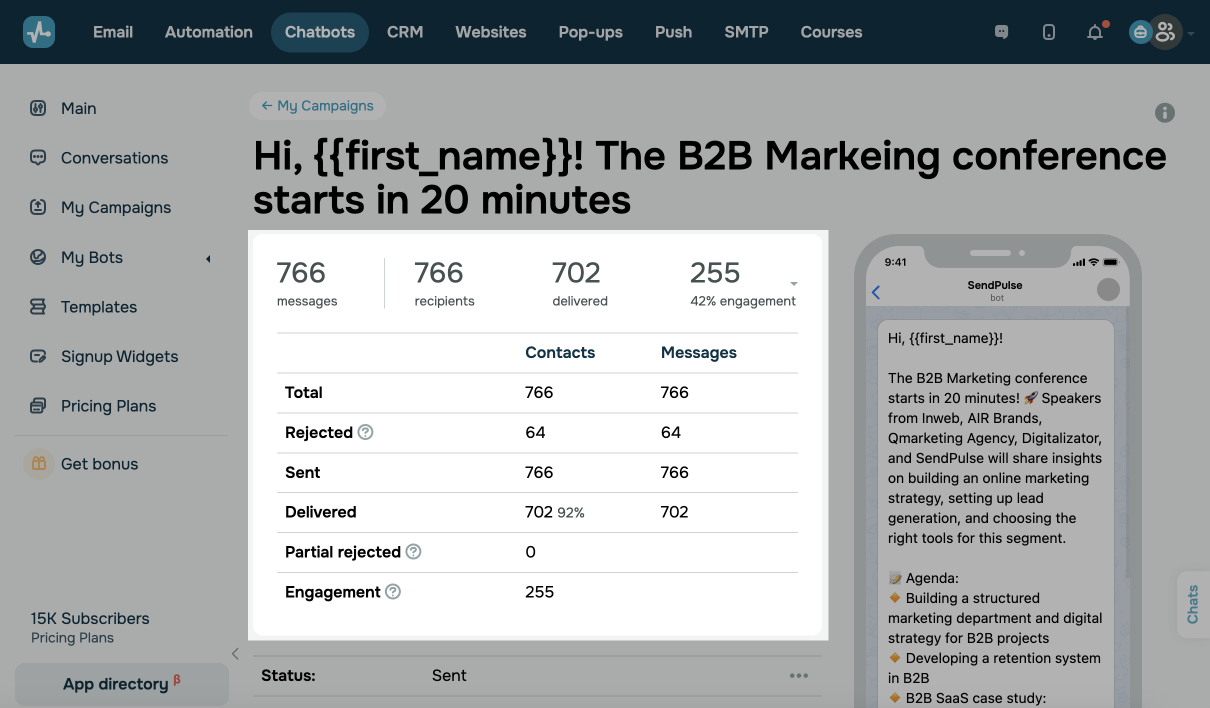
Expanded statistics
Click on the arrow in the right corner of the table to see your detailed statistics.
| Recipients | The number of users selected to receive your campaign. |
| Rejected or partially rejected | The number of recipients who have blocked your messages or complained about the content you sent. |
| Sent | The number of recipients your message was sent to, but they have not received it yet. |
| Delivered | The number of recipients who are online and have successfully received your message but have not yet read it. |
| Read | The number of recipients who have read your message. You can also analyze your read rate compared to the number of delivered messages. |
| Engagement | The number of recipients who interacted with your chatbot after sending the campaign and clicked on your button links. It is displayed only for Telegram chatbots instead of the Read indicator. You can also analyze your engagement rate compared to the number of delivered messages. |
Campaign status
You can also check the status of your campaign. Campaigns can have the following statuses: In Progress (for new campaigns sent to recipients), Scheduled, Cancelled, and Sent.
Campaign recipients
You can also check your statistics for each recipient separately, for instance, your sending status and the time when your campaign status was changed.
Recipients can have the following statuses:
| Delivered | A recipient has received your message successfully but has not opened it yet. |
| Read | A recipient has read your message. |
| Rejected | A recipient or a social network has rejected your message. Next to the "Rejected" status, there may be a more detailed explanation about the reason for a sending error. Most often, messages are rejected because a message or chatbot is blocked by a subscriber or a social network itself.
Read also: Common reasons why your Facebook page got blocked |
| Clicks | A recipient has clicked on your button link. It is displayed only on Telegram and Facebook. To enable tracking, go to Bot Settings, then to the General tab, and enable Link Tracking. |
 Last Updated: 09.09.2025





or